


BTC Cloud Mining : TapMiner
3.232.00 Reviews
App Specs
- Version
- 1.0.5
- Updated On
- License
- Free
- Downloads
- 100,000+
- Developer
- QF Intech
- Categories
- Finance
- Platform
- Android
Screenshots
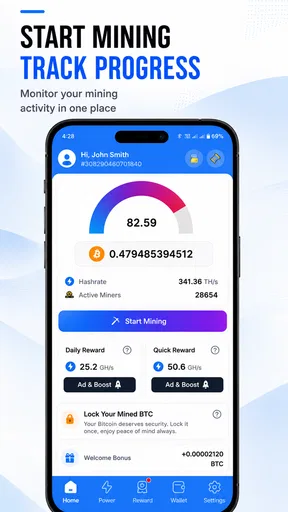
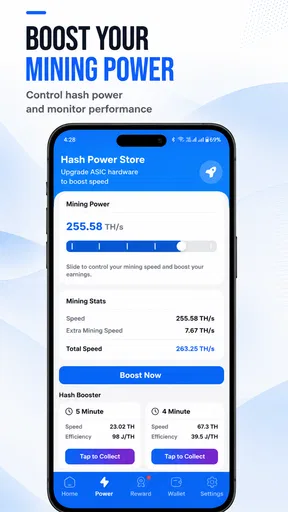
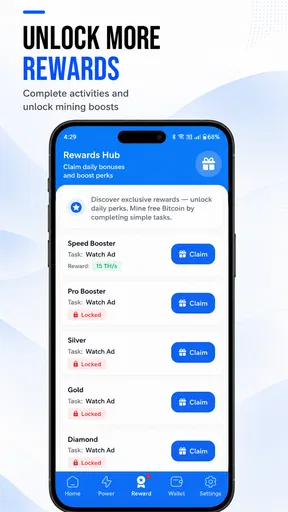
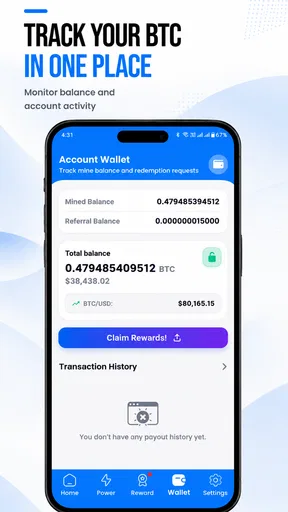
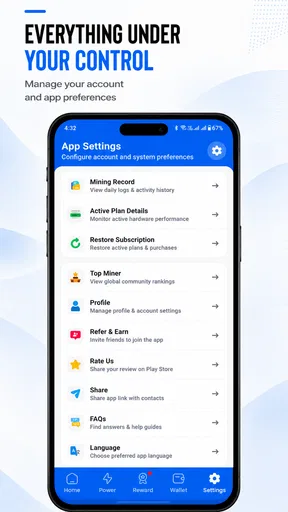
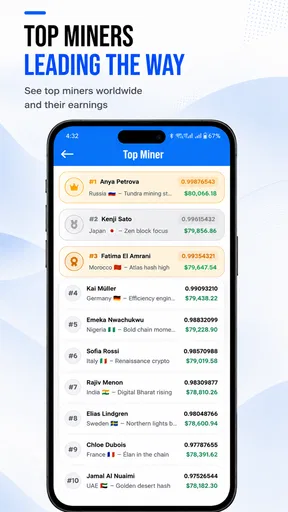
 Analysis by AppCompare
I would treat BTC Cloud Mining: TapMiner as a shared-device app that needs clear expectations before anyone in the household starts using it. Its simple tapping loop can look like a harmless game, while its Bitcoin theme can make it feel like a real financial tool. That distinction matters: I would not let a curious family member assume that tapping guarantees a useful amount of cryptocurrency or that a growing in-app balance is the same as money they can readily spend.
A small shared-device scenario
Imagine a household tablet left on the kitchen counter. One person opens TapMiner during a break, then a younger relative sees the Bitcoin imagery and wants to try it later. The app’s quick, game-like interaction may make it easy to pass the device around, but that does not make shared use automatically straightforward. I would decide who is responsible for the account and progress before handing over the device, rather than letting several people tap without knowing whose activity they are affecting.
This is especially useful if you want a casual conversation starter about cryptocurrency. You can look at the app together and discuss the difference between a simulated or simplified mining experience and the costly, technical work involved in operating real mining hardware. I would frame it as an interactive demonstration, not as a household earning plan.
Set expectations before tapping
Before spending time on upgrades, I would check what the app itself presents as an in-app balance and what actions it asks of me. The most practical question is not simply how quickly the number grows; it is what the app says that balance represents and what steps, if any, are involved in using it outside the app. A rising counter can be satisfying, but it should not be treated as spendable Bitcoin without understanding the distinction.
That distinction is one of the main trade-offs here. TapMiner makes the idea of mining approachable by reducing it to a phone-friendly routine, but that simplicity can blur the gap between a game-like progression system and real-world cryptocurrency mining. I would use it to explore the concept, while turning to a dedicated educational resource or a more transparent financial tool if my goal were to understand actual mining economics or manage real crypto assets.
There is also a spending boundary worth setting early. The app is free to download, but it includes optional in-app purchases, with listed item prices ranging from $4.49 to $239.99. I would not buy an upgrade just because it promises faster progress: first decide whether you are comfortable paying for entertainment, then consider whether the purchase changes the experience in a way you genuinely value. For a shared device, that conversation should happen before someone else encounters a purchase prompt.
Coordinate without confusing accounts
If more than one person wants to try it, I would keep the arrangement simple: agree on one person who manages the account and purchases, and let others take turns only if everyone understands that they are contributing to the same progress. Do not assume that separate people will have separate balances or private progress just because they use the same device. The distinction between device access and account ownership is important in any finance-themed app.
Worth Reading Before You Choose

EA SPORTS FC Mobile 26 Is a Bigger Football Game, but It Takes Time

Flipboard Shows What News Apps Must Do Beyond the Feed

Switching to Android Auto Means Rethinking Your Driving Routine

Google Calendar Makes a Crowded Week Easier to Manage

Ludo King Makes the Most of the Minutes Between Plans

Baby Panda World Brings Quick Play to Modern Phones, but Its Game Library Feels Busy
A useful routine is to have the account holder check the app after a shared session, review any changes, and explain what was upgraded. This avoids arguments over who spent an in-app resource or made a purchase. It also turns the app into a better learning moment: instead of treating taps as automatic income, you can ask what the upgrade changes and whether the progress is only part of the app’s own system.
I would also avoid sharing account credentials casually. A household member who only wants to see the interface does not need to control the account or payment method. Keeping that boundary is a small but sensible way to prevent accidental changes, especially when a child is using a device that also has access to app-store purchases.
Age, trust, and what the app can teach
TapMiner is rated Everyone, so its age label is broad and welcoming. In my view, that makes adult guidance more—not less—useful when the app is used by a child. The subject is Bitcoin, and the game-like presentation can invite questions about earning, investing, and risk. I would answer those questions directly: the app’s simplified tapping mechanic is not a reliable lesson in how a real mining operation works, and it should not be presented as a way to make household income.
For an adult who is simply curious, the low-friction format can be a pleasant way to encounter mining vocabulary and incremental progression. For someone making financial decisions, though, it is the wrong place to seek practical advice. I would compare it with a straightforward explainer or a reputable wallet or exchange app only after being clear about the different jobs those products do. TapMiner leans toward casual interaction; a real financial service needs clearer attention to custody, transaction costs, security, and market risk.
Trust also comes down to patience. The developer is QF Intech, and the app has an average rating of 3.2 from around 1,200 ratings. I take that as a reason to approach it with measured expectations rather than assuming every user will find the experience equally satisfying. The rating does not tell me exactly what another person will encounter, but it supports a sensible approach: try the free experience first, avoid treating the app as an investment, and do not spend money until you understand why you want to.
Who should try it—and who should pass
I can see TapMiner suiting someone who enjoys idle or clicker-style apps and wants a Bitcoin-themed diversion on a phone. It may also work for an adult who wants a simple prompt for discussing crypto concepts without setting up mining equipment. The strongest reason to try it is entertainment and curiosity, not a promise of meaningful returns.
I would skip it if you expect a practical mining setup, dependable income, or a serious portfolio-management tool. It is also a poor fit if you dislike repetitive tapping, prefer apps that explain every financial mechanism in depth, or would feel pressured by optional purchases. In those cases, a non-monetary clicker game may be a cleaner choice for casual play, while a carefully chosen educational resource is better for learning and a dedicated financial app is more appropriate for managing real assets.
For a first trial, I would keep the session short and observe what the app asks me to do before committing to a routine. I would note whether the pace feels enjoyable, whether the upgrade choices are understandable, and whether the app’s presentation keeps the distinction between game progression and real Bitcoin clear. That check is more useful than judging it by how quickly a counter changes.
What to keep in mind over time
TapMiner is free, but that does not mean every part of the experience is cost-free: optional purchases can change how quickly a player progresses, and the listed price range is wide. If you share a device, use the store’s purchase protections and keep payment approval with the account holder. I would avoid leaving a payment method accessible to someone who is only meant to explore the tapping mechanic.
The app is listed at version 1.0.5 and requires Android 8.0 or later. It has passed 100,000 installs, which suggests it has found an audience, but popularity is not a substitute for deciding whether its particular routine suits you. I would also remember that an app update can change how an interface behaves, so it is sensible to review the current screens and purchase prompts rather than relying on assumptions from an earlier session.
One non-obvious way to get more value from it is to treat upgrade choices as a small exercise in opportunity cost. Before selecting an upgrade, ask what you give up by not choosing another one, and whether the decision is simply making the in-app loop more engaging. This gives the tapping a bit of structure without pretending that a game mechanic is a real-world mining strategy.
Another useful boundary is to decide in advance how often you want to check in. A 24/7 mining theme can encourage the impression that constant attention is necessary, but I would not let a casual app interrupt work, family time, or sleep. If progress only feels worthwhile when you keep returning to monitor it, that is a sign the app may not be a good fit for your routine.
The Concept Behind TapMiner
So, what exactly is BTC Cloud Mining: TapMiner? It’s essentially a cloud-based mining simulator that lets you get a taste of crypto mining without actually having to buy expensive mining rigs. The app promises a user-friendly experience where you can earn Bitcoin by simply tapping away on your phone. Sounds easy, right?
The beauty of TapMiner is that it makes Bitcoin mining accessible to everyone. You don’t need a tech degree to get started, and there’s no need to worry about the technicalities of mining. It’s all about tapping, upgrading, and watching your virtual wallet grow.
Getting Started
First things first, let’s talk about how to get started. After downloading the app, you’ll need to set up an account. Don’t worry, it’s a breeze. Once you’re in, you’ll be greeted with a simple interface that guides you through the basics. The app is available for both Android and iOS, so no one’s left out.
One thing I appreciated was the straightforward tutorial. It takes you through the essential functions without overwhelming you with information. You’ll learn how to tap to mine, upgrade your equipment, and manage your earnings. It’s intuitive enough that even if you’re new to the world of crypto, you’ll catch on quickly.
The Gameplay Experience
Let’s dive into the gameplay. The main activity in TapMiner is, unsurprisingly, tapping. The more you tap, the more Bitcoin you earn. It’s a bit like a clicker game, and it can be oddly satisfying. As you accumulate Bitcoin, you can invest in upgrades to make your mining operation more efficient.
Upgrades are crucial as they increase your mining power, allowing you to earn more Bitcoin with each tap. You can upgrade your mining equipment, hire virtual staff, and even invest in additional features to boost your earnings. It’s a classic case of the more you invest, the more you earn.
What I found fascinating is the strategic element involved. You can choose which upgrades to prioritize based on your mining strategy. Do you go for quick gains with smaller upgrades or save up for the big guns? It adds an interesting layer of decision-making to the game.
Visuals and User Interface
The app sports a clean and colorful design that’s easy on the eyes. The graphics are simple but effective, making it easy to navigate through the different sections. The developers have done a good job of keeping the interface clutter-free, which I definitely appreciate. It’s all about functionality without sacrificing aesthetics.
Everything is laid out in a way that feels intuitive. Whether you’re checking your earnings or upgrading your equipment, it’s all just a tap away. The app’s performance is smooth, and I didn’t encounter any lags or crashes during my time with it.
Is It Worth Your Time?
Now, the big question: Is TapMiner worth your time? If you’re looking for a way to earn Bitcoin without too much effort, it’s a fun and engaging way to do so. While you won’t become a Bitcoin millionaire overnight, it offers a lighthearted introduction to the world of crypto mining.
It’s a great option if you enjoy casual games with incremental progress. The tapping mechanic can be addictive, and the incremental upgrades keep you coming back for more. Plus, there’s the added bonus of learning the basics of mining, albeit in a simplified form.
Final Thoughts
In conclusion, BTC Cloud Mining: TapMiner is a nifty little app that combines the casual fun of a clicker game with the intriguing concept of Bitcoin mining. It’s not going to replace your day job, but it’s a fun way to dip your toes into the world of cryptocurrency.
If you’re curious about mining and want a low-risk introduction, give TapMiner a shot. It’s perfect for killing some time while learning a bit about the crypto world. Just remember to keep those fingers limber, because you’ll be tapping a lot!
My household verdict
For a household, I would describe TapMiner as a casual, Bitcoin-themed activity that works best when one adult sets the expectations and keeps account and purchase decisions clear. The app is free to try, but I would treat any optional spending as entertainment spending, not as an investment intended to return money. Its Everyone age rating does not remove the need to explain the difference between an app’s progress and real financial value.
My recommendation is conditional: try it if you enjoy tapping games and are curious about the language of crypto, but keep the session and any spending in proportion. If your priority is learning how real Bitcoin mining works, understanding financial risk, or coordinating independent accounts across a family, choose a resource built specifically for that job. TapMiner is most convincing as a light diversion, and less convincing when judged as a serious finance tool.
Pros
- User-friendly interface for easy navigation.
- No upfront investment required to start.
- Daily bonuses to boost mining speed.
- Supports multiple cryptocurrencies for mining.
- Regular updates with new features and improvements.
Cons
- Requires constant internet connection.
- Advertisements can be intrusive.
- Payouts can be slow at times.
- Limited customer support options.
- Consumes significant battery power.
FAQs for BTC Cloud Mining : TapMiner
What exactly is BTC Cloud Mining: TapMiner and how does it work?
BTC Cloud Mining: TapMiner is a mobile application designed to simulate Bitcoin mining on your smartphone. It provides users with a virtual mining experience without the need for expensive hardware. Users can earn rewards by interacting with the app, completing tasks, and participating in the community, which mimics the process of actual Bitcoin mining.
Is BTC Cloud Mining: TapMiner free to use or are there any hidden costs?
The app is free to download and use, offering basic features at no cost. However, it includes optional in-app purchases and subscriptions that can enhance the mining experience and potentially increase rewards. Users should review these options carefully to understand any potential costs involved before making a purchase.
How secure is BTC Cloud Mining: TapMiner in terms of data privacy?
BTC Cloud Mining: TapMiner prioritizes user privacy and security. The app employs encryption and secure data handling practices to protect user information. It's important for users to read the privacy policy and terms of service to fully understand how their data is managed and to ensure their comfort with the app's practices.
Can I actually earn Bitcoin with BTC Cloud Mining: TapMiner?
While BTC Cloud Mining: TapMiner offers a gamified experience of mining, the app primarily rewards users with virtual currency and in-app credits. It does not directly mine real Bitcoin. Users can redeem these virtual rewards for various benefits within the app, but should not expect significant financial returns.
What kind of device compatibility does BTC Cloud Mining: TapMiner offer?
BTC Cloud Mining: TapMiner is compatible with both Android and iOS devices. It requires a stable internet connection and works best on devices running the latest operating systems for optimal performance. Users should ensure their device meets the app's requirements to avoid functionality issues.


